AI Food Scanners: Can a Photo Really Count Calories?
A clear look at how AI food scanners estimate calories, where photo estimates go wrong, and how to get a result that is actually useful.
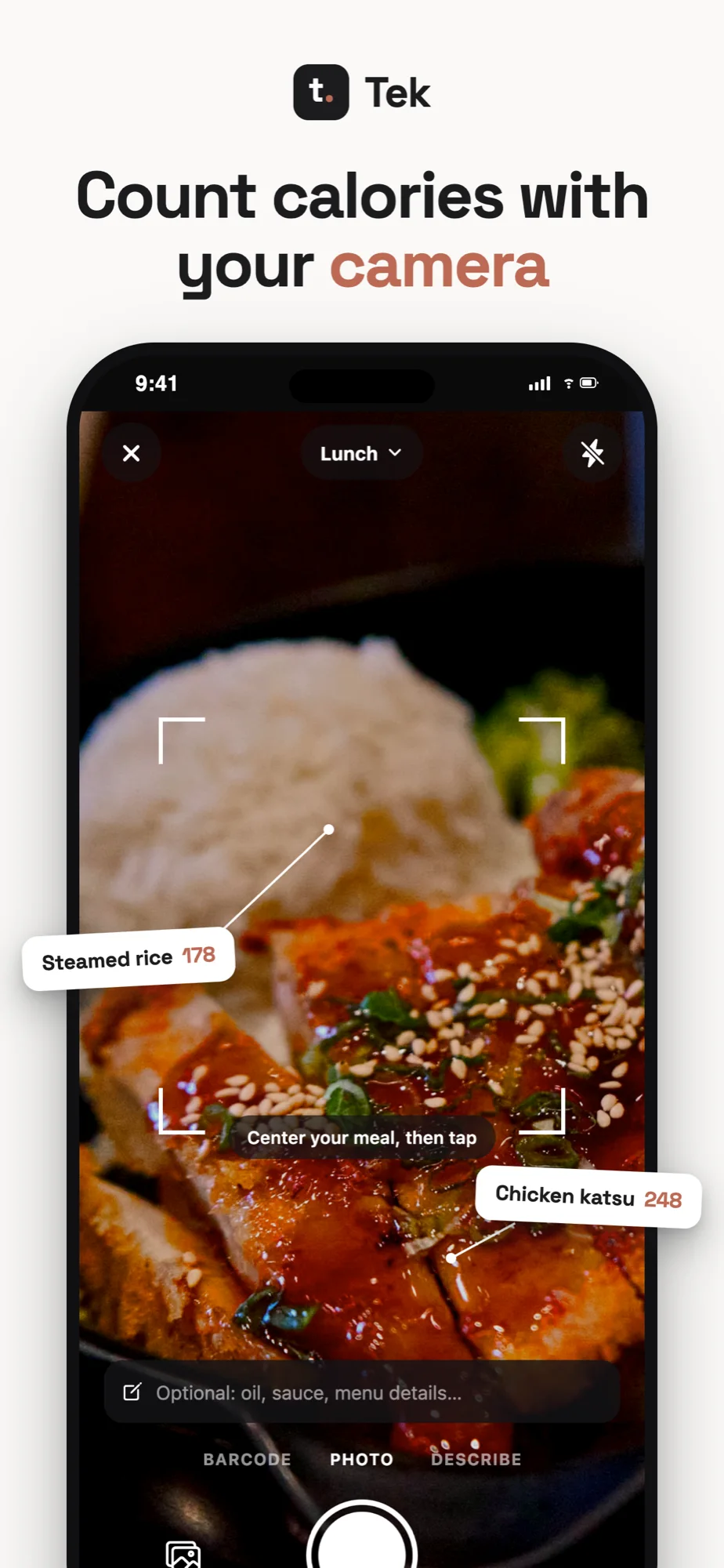
A camera can recognize a chicken breast. It cannot see the tablespoon of oil left in the pan.
That is the simplest way to understand an AI food scanner. It can make calorie tracking much faster, especially when the alternative is searching a database for every item on your plate. But it is still working from visual clues. Some meals offer plenty of clues. Others hide most of the useful information.
So, can a photo really count calories?
It can produce a useful estimate. It cannot measure every meal exactly. The difference matters. Used as a quick first draft, a food scan can save time and help you keep a consistent record. Treated as a precise measurement, the same result can give you more confidence than the photo deserves.
One photo, three different jobs
The answer is only as good as the weakest guess.
- 1Usually visible
Recognize
Chicken, rice, broccoli
- 2Estimated
Size
Grams, depth, density
- 3Needs context
Match
Recipe and nutrition data
What an AI food scanner has to figure out
The finished result looks simple: a meal name, a calorie total, and a few macro numbers. Getting there requires several separate guesses.
First, the scanner has to identify the foods. Then it has to estimate how much of each food is present. Finally, it has to match those foods and portions to nutrition data.
Each step can be right while the final answer is still off.
Imagine a plate with grilled chicken, rice, and broccoli. The foods are easy to recognize. The harder questions are not visible at a glance:
- Is that 120 grams of chicken or 180?
- Was the rice cooked in water, stock, or coconut milk?
- How much oil was used on the broccoli?
- Is there butter under the chicken?
Food recognition gets most of the attention because it is easy to demonstrate. Portion size and recipe details usually cause the bigger errors.
Why portions are hard to read from a picture
A normal photograph flattens a three-dimensional meal into a two-dimensional image. The camera sees the top of the rice, but not its depth. It may see the width of a steak without knowing its thickness. A small bowl close to the camera can look larger than a big bowl farther away.
Some phones can provide depth information, and software can use familiar objects such as a plate or fork as scale references. That helps. It does not turn the phone into a kitchen scale.
Researchers have worked on food portion estimation for years. The results show both the promise and the limit of the method.
A systematic review and meta-analysis of image-based dietary assessment found that estimated energy intake was under-reported across the included studies. The authors also found substantial variation between studies.
In another study, researchers compared food photos with weighed food records in everyday conditions. Photography underestimated energy intake on average. More importantly, the error for an individual could be much larger in either direction.
These studies did not test every modern food-scanning app. They do show why no app can promise the same accuracy for a banana, a curry, and a restaurant lasagna.
What the camera can see matters.
The same scanner can be useful on one plate and badly under-informed on the next.
Fruit
Eggs and toast
Separated plates
Packaged food
The meals a scanner handles best
An AI food scanner has the best chance when the plate is visually straightforward. Separate foods with clear edges are easier than mixed dishes. Familiar foods are easier than regional dishes the model rarely encounters. A visible portion is easier than one buried under sauce.
Good candidates include:
- Fruit and other single whole foods
- Eggs, toast, and simple breakfast plates
- A protein, starch, and vegetable served separately
- Packaged food with a visible label or barcode
- Repeat meals that you have already corrected once
A scan of these foods can still miss the portion, but at least the camera has a fair view of what it is being asked to estimate.
The meals that fool a food photo
Mixed and restaurant dishes are much harder. A bowl of curry might contain a small amount of coconut milk or half a can. Both versions can look nearly identical. A salad can be 300 calories or 800 calories depending on dressing, cheese, nuts, and oil.
The usual troublemakers are:
- Cooking oil and butter
- Dressings, spreads, and creamy sauces
- Sugar or cream mixed into drinks
- Ground meat with an unknown fat percentage
- Soups, stews, curries, and casseroles
- Restaurant meals with no recipe information
- Smoothies with ingredients hidden by blending
These are not edge cases. They are ordinary meals. A useful scanner should make them easy to clarify instead of quietly presenting a guess as fact.
Food identity and calorie accuracy are not the same thing
It is tempting to judge a scanner by whether it names the meal correctly. Recognition feels impressive. If the app spots salmon, potatoes, and asparagus, it looks like the hard work is done.
Naming the food is only the first step.
A 100-gram salmon fillet and a 200-gram fillet have the same name. Potatoes roasted with a light spray of oil and potatoes cooked in several tablespoons of oil can look alike. The scanner may identify every item and still miss the meal total by hundreds of calories.
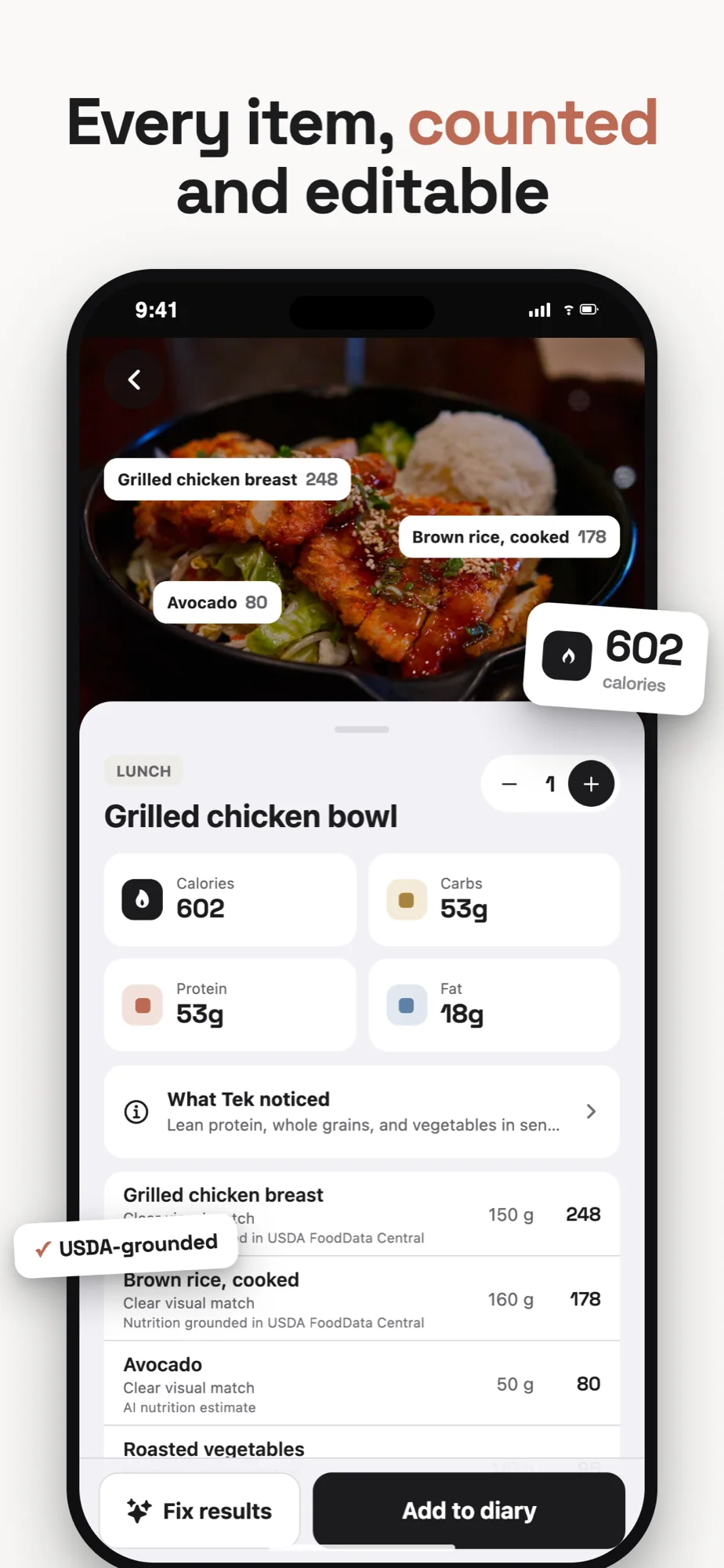
This is why a good result should show its work. You should be able to see the foods, portions, and calories that make up the total. If the answer is a single number with no practical way to inspect it, you cannot tell which assumption needs fixing.
Designed for correction, not blind trust
Tek shows the foods behind the number.
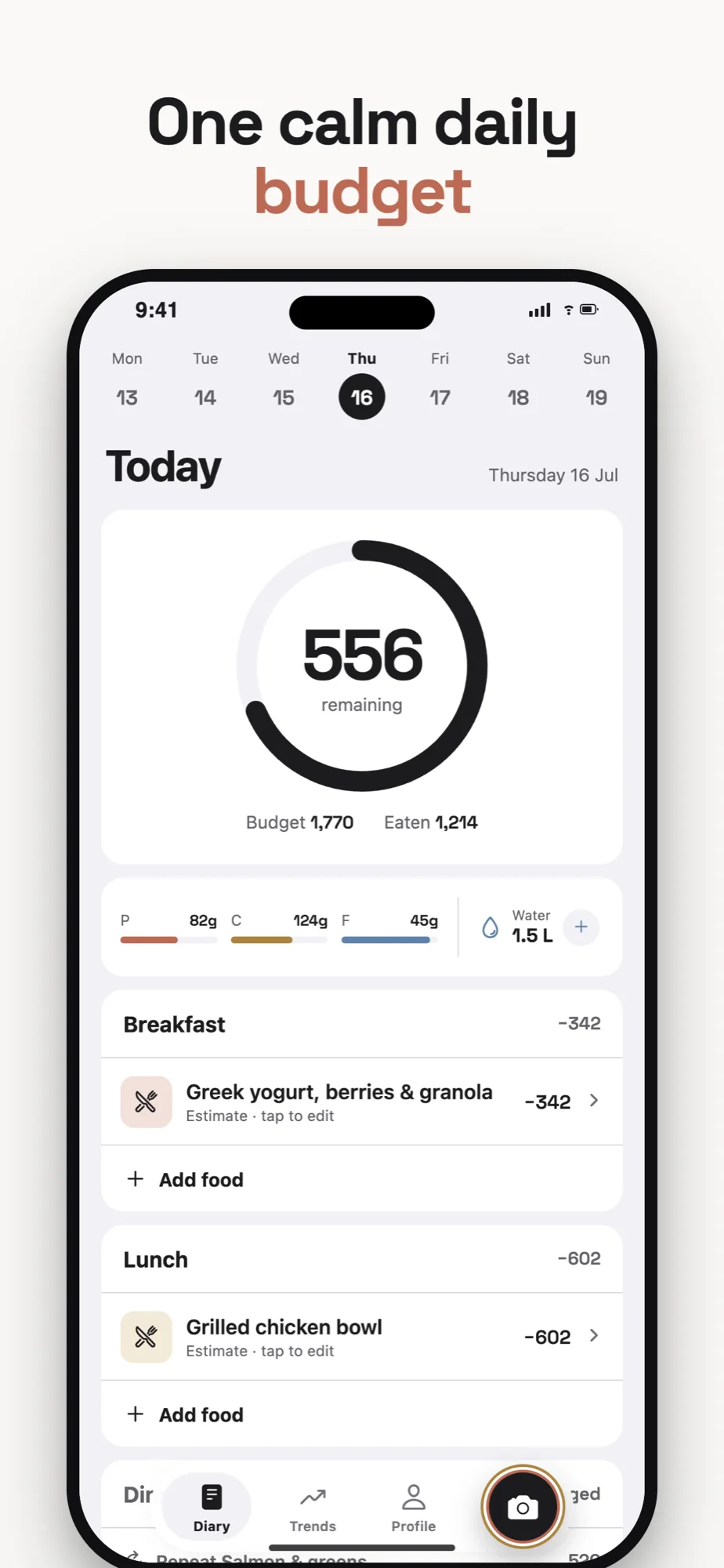
Review each item, change a portion, add a missing sauce, then return to one calm daily budget. The estimate starts the log. You finish it.
- Itemized foods and portions
- USDA grounding when available
- Plain-language fixes
- Every estimate stays editable
How to get a better estimate
You do not need to photograph every ingredient like a crime scene. A few habits give the scanner better evidence and make corrections easier.
Keep the whole plate in frame
Do not crop the edges of the food or hold the camera so close that scale becomes impossible to judge. Take the picture from a slight angle so the app can see both the surface and some depth.
Separate foods when it is easy
The scanner will have an easier time with chicken next to rice than chicken buried under rice. There is no need to rearrange dinner, but clear boundaries help.
Add the detail the camera cannot see
A short note can be more valuable than a better photograph. Mention that the coffee contains milk, the vegetables were cooked in oil, or the bowl includes two eggs. The goal is not to write a recipe. It is to supply the missing fact that changes the estimate.
Use the barcode when the label knows more
For packaged food, the nutrition label is usually better evidence than appearance. A photo can recognize a protein bar. A barcode can identify the exact bar and its serving values. The same holds for large chains that publish full nutrition data: when the numbers already exist, use them instead of estimating, as with a high-protein Chipotle order.
Correct the large miss, then move on
If the scanner shows one cup of rice and you know you ate two, fix it. If it calls a chicken thigh a breast, fix it. Chasing a five-calorie difference is unlikely to improve your decisions.
Useful accuracy is not the same as perfect accuracy. The point is to remove the mistakes large enough to distort the pattern.
A simple test before you trust an app
Most food scanners look convincing in a carefully chosen demo. Test one with the meals you actually eat.
Try these five:
- A simple plate with three separate foods
- A mixed bowl or casserole
- A packaged item with a nutrition label
- A restaurant meal with sauce or dressing
- A meal you eat every week
Do not focus only on the first calorie number. Ask better questions:
- Did it identify the important foods?
- Are the portions believable?
- Can you inspect how the total was built?
- Is it quick to add oil, sauce, or a hidden ingredient?
- Can you change grams, calories, and macros without starting again?
- Does the corrected meal become easier to log next time?
The best AI food scanner is not the one that never makes a mistake. That scanner does not exist. The best one makes a credible first pass and lets you repair the miss in a few seconds.
When a photo estimate is good enough
Calorie tracking is not a laboratory experiment for most people. It is a way to notice patterns, plan a day, and make small adjustments over time.
If a quick photo helps you record lunch when you would otherwise record nothing, the estimate has value. If the same breakfast is logged in roughly the same way each morning, the trend can still be useful even when the number is not perfect.
Problems start when an app hides uncertainty or when the user treats a single meal as exact. A low estimate does not create permission to keep eating, just as a high estimate does not mean the day is ruined.
Look at several days. Correct obvious errors. Let the pattern carry more weight than one photograph.
The practical answer
AI food scanners work best as a shortcut between seeing a meal and creating an editable food log. They are faster than manual entry and more informative than guessing from memory at the end of the day.
They are not kitchen scales. They cannot see every ingredient, know every recipe, or recover the exact weight of food from every angle.
That is not a reason to dismiss them. It is a reason to design them honestly.
Tek is built around that distinction. The photo gets you to a useful draft quickly. The foods and portions remain visible. Corrections stay close at hand. When the image does not provide enough evidence, the app should ask for context instead of inventing certainty.
Take the picture. Check the big assumptions. Keep going.
Frequently asked questions
Are AI food scanners accurate?
They can identify common foods and produce useful calorie estimates, especially for simple plates. Accuracy drops when portions are unclear or ingredients are hidden. Treat the result as an editable estimate rather than an exact measurement.
Can an app calculate calories from a photo?
An app can estimate calories by recognizing foods, estimating their portions, and matching them with nutrition data. The photo alone cannot reveal every ingredient or exact weight.
What foods are hardest for a calorie scanner?
Mixed dishes, restaurant meals, sauces, oils, smoothies, soups, and casseroles are difficult because visually similar meals can have very different recipes and calories.
Is a photo calorie app better than manual tracking?
It is usually faster. Manual tracking can be more precise when you know the recipe and weights. A practical app should let you start with a photo, then add or correct the details that matter.